
The latest trainings
PC SMPS Voltages Explained + Easy Testing Guide
Dec
PC Power Supply Voltages: Why Stable PSU Rails Matter
A PC power supply (PSU) or switching power supply (SMPS) is the heart of your computer. It converts the high-voltage AC from your wall outlet into the low-voltage DC that your computer components need to function. The PC power supply voltages are not just numbers on a spec sheet—they are critical to the safety and performance of your PC.
After watching the video below, continue reading for more useful information.
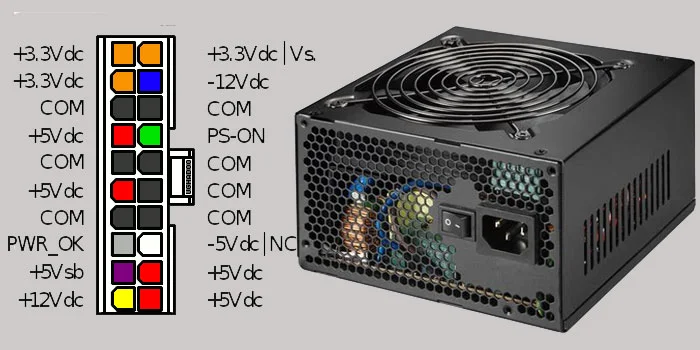
Most modern PCs use an ATX PSU that provides several voltage rails: typically +12V, +5V, and +3.3V, along with some auxiliary voltages like -12V and 5VSB. Each of these voltages has a specific purpose:
-
+12V Rail: Powers major components like the CPU, GPU, and hard drives. This is the most demanding rail and carries most of the current.
-
+5V Rail: Powers older components and some logic circuits on the motherboard. Even though many modern systems use 12V primarily, the 5V rail is still important for USB ports, some storage devices, and peripheral circuits.
-
+3.3V Rail: Powers memory modules (RAM), some chipset functions, and various low-power logic circuits.
Having the right PSU voltages is crucial because if these rails drift too far from their nominal values, components can malfunction or even get damaged.
Why Voltage Stability Matters
When we talk about voltage stability, we mean that the output voltage stays as close as possible to the rated value under varying loads. For example, a 12V rail should ideally stay at 12V ± 5% (11.4V–12.6V). This stability is important for several reasons:
-
Protecting the CPU and GPU: Modern CPUs and GPUs are extremely sensitive to voltage fluctuations. Even a small spike above the rated voltage can cause overheating or permanent damage. On the other hand, undervoltage can lead to system instability, crashes, or failure to boot.
-
Preventing RAM Errors: RAM modules rely on stable 3.3V or 1.2V (for DDR3/DDR4/DDR5) rails. Voltage dips can result in memory errors, causing applications to crash or data to become corrupted.
-
Ensuring Motherboard Longevity: Motherboards have voltage regulators and various ICs that depend on steady input voltages. If the 5V rail fluctuates significantly, it can stress these components, leading to early failure.
-
Safeguarding Storage Devices: Hard drives and SSDs expect stable power for proper read/write operations. Voltage drops can corrupt data or, in extreme cases, damage the drive’s controller.
Common Effects of Unstable PSU Voltages
Let’s look at what can happen if your PC PSU voltages are unstable:
-
Random Reboots or Crashes: If the 12V rail sags under load, your CPU and GPU may not get enough power, causing the system to restart unexpectedly.
-
BSOD and Data Corruption: Memory errors due to unstable 3.3V or 5V rails can trigger Blue Screens of Death (BSOD) in Windows and corrupt data on storage devices.
-
Peripheral Malfunctions: USB devices and PCIe cards may fail to operate correctly if the 5V or 3.3V rails fluctuate, leading to connection issues or device failure.
-
Overheating: A PSU that produces higher-than-rated voltages can cause excessive heat in components, especially in VRMs (voltage regulator modules) on the motherboard, potentially burning them out.
-
Reduced Lifespan of Components: Continuous exposure to non-stable voltages gradually wears out capacitors, ICs, and power stages on the motherboard and GPU, shortening their usable life.
How PC Power Supply Ensures Voltage Stability
Switching power supplies (SMPS) are designed with several features to maintain stable voltages:
-
Voltage Regulation Loops: The PSU constantly monitors output voltages and adjusts the PWM (pulse-width modulation) signal to keep them stable.
-
Capacitors and Filters: Large electrolytic capacitors smooth out voltage ripples, while smaller ceramic capacitors handle high-frequency spikes.
-
Overvoltage and Undervoltage Protection (OVP/UVP): Most quality PSUs shut down automatically if any rail exceeds safe limits.
-
Current Sharing Across Rails: Some PSUs distribute load intelligently to prevent excessive sag on any single rail.
Despite these features, age, poor quality components, or sudden surges in mains power can still lead to voltage instability. This is why knowing the PC power supply voltages and monitoring them during operation is important for system reliability.
Diagnosing Voltage Problems
When a PC exhibits instability, one of the first steps in troubleshooting is checking PSU voltages. Tools and methods include:
-
Multimeter Measurement: Check the DC voltages at the 24-pin ATX connector. They should match the rated values within ±5%.
-
Software Monitoring: Tools like HWMonitor or AIDA64 read motherboard sensors to provide voltage levels, although these may be less accurate than a multimeter.
-
Load Testing: A PSU tester or dummy load can reveal sagging rails that may not appear under light idle loads.
Why Learning PSU Voltages is Important
For PC repair, understanding PC PSU voltages is not just theoretical—it helps you make informed decisions:
-
Safe Component Replacement: If you know the 12V rail is unstable, replacing a CPU or GPU without addressing the PSU could damage the new component.
-
Preventive Maintenance: Recognizing early signs of voltage instability can prevent permanent damage to the motherboard and storage devices.
-
DIY Repairs and Testing: For enthusiasts, being able to measure and interpret PSU voltages enables safer DIY upgrades, testing, and troubleshooting.
Common Faults and Their Signs
-
12V Rail Problems: System reboots under high CPU/GPU load, fans spin erratically, or GPU artifacts appear.
-
5V Rail Problems: USB devices fail intermittently, old hard drives misbehave, or motherboard POST errors occur.
-
3.3V Rail Problems: RAM errors, POST failures, or instability in certain PCIe cards.
Identifying which rail is causing the issue is critical because replacing the PSU may solve the problem entirely if it is the source of unstable voltages.
Choosing a Quality PSU
Not all PSUs are created equal. Cheap or low-quality units often fail to maintain stable voltages under load. Key factors for a stable PSU include:
-
High Efficiency (80 Plus Rating): More efficient PSUs generate less heat and provide more stable output.
-
Good Quality Capacitors: Japanese capacitors, for example, have lower ESR and longer life, improving voltage stability.
-
Proper Protections (OVP, UVP, OCP): Ensure that the PSU can protect components from spikes and overcurrent situations.
-
Sufficient Wattage: A PSU should have enough headroom above peak system load to avoid excessive stress on rails.
Conclusion
Understanding PC power supply voltages and their importance is crucial for anyone dealing with PC maintenance, repairs, or DIY builds. Stable PSU rails ensure the longevity of the CPU, GPU, RAM, storage devices, and motherboard. Voltage instability, even if minor, can lead to crashes, data corruption, overheating, and permanent hardware damage.
By learning how to check and interpret SMPS voltages, you can diagnose issues early, prevent costly damage, and ensure your system runs reliably. A quality PSU with stable outputs is not just a component—it’s the foundation of a healthy and reliable PC.
Remember, whether you are troubleshooting a failing PC or building a new system, paying attention to PC PSU voltages is one of the smartest ways to protect your investment and avoid headaches in the long run.
